Skip to content

The local-first KiCad companion

Focus on your design,not the grunt work.

AmpereBrain automates the manual overhead of hardware design, so you can spend more time designing and less time managing files, reviews, or datasheets.

Runs locally. Your design stays yours, in KiCad — no cloud project, no lock-in.

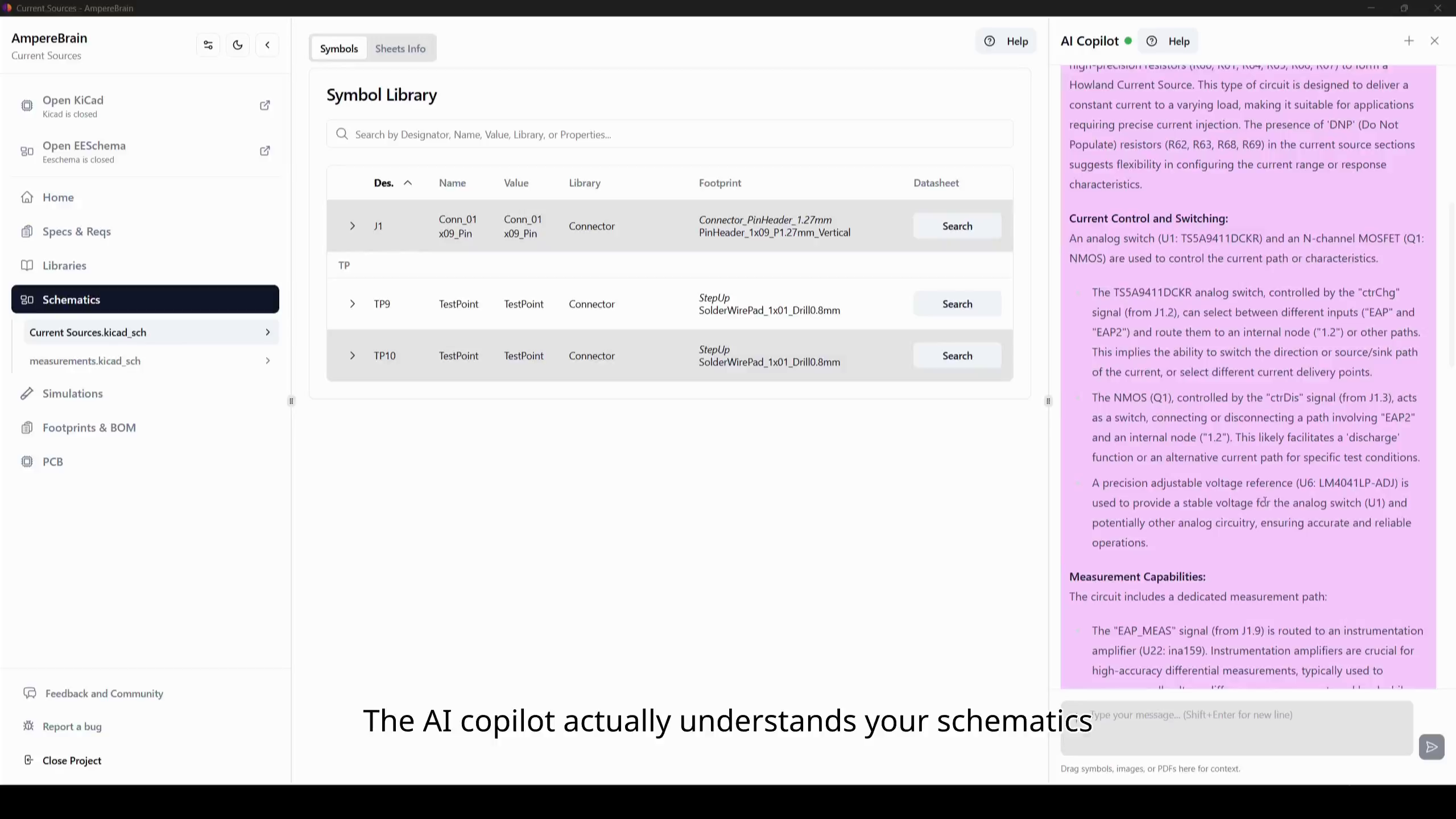
An AI copilot that reads your datasheets
AmpereBrain's AI copilot answering from a component datasheet next to the symbol library table.

See AmpereBrain at work.

Follow a real project workflow: analyze the schematic, retain its context, and keep design changes reviewable.

Core Features

Worry less about versioning, library management, reviews, simulations, and BOM management.

AmpereBrain does not replace the editor. It handles the workflow that usually leaks into tabs, folders, and ad-hoc habits.

01

Project Dashboard

Your project's status, in one view

One dashboard for project status and quality: DRC and ERC results, BOM status, part availability for the variants you build, whether your simulations still pass against the production schematic, and which specifications and requirements still need review or approval.

Everything on the dashboard is derived from the project itself, so it cannot drift from the design it describes.

02

Specs & Requirements

A formal spec for every design

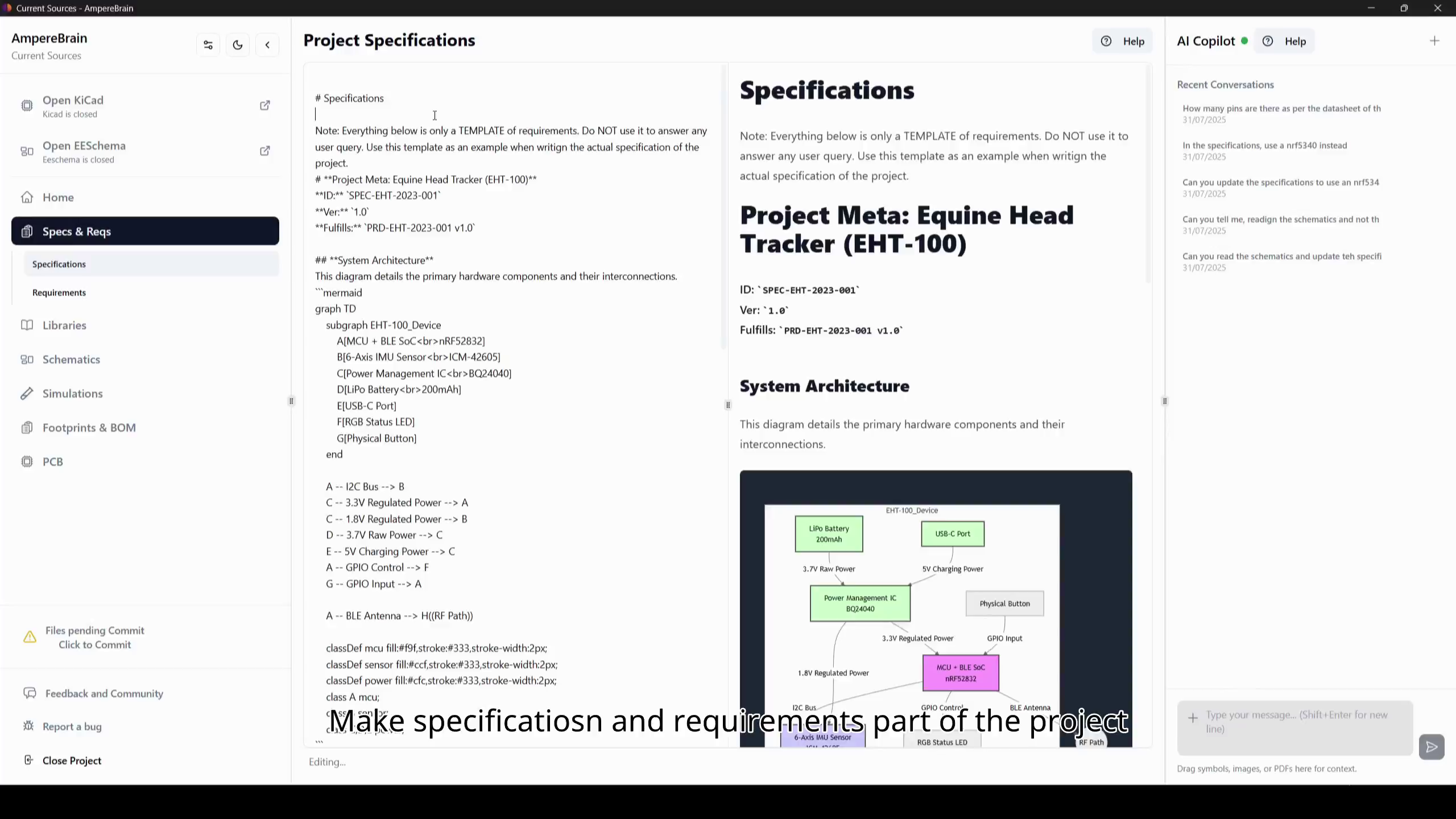
Specifications and requirements start from a structured template, and the AI copilot helps you complete them and keep them in sync as the project evolves. They stay formal, versioned, and stored with the project.

Everyone reviews and approves the same requirements. It also covers test results and other document types, configured for your industry, so the structure stays flexible and AI-ready. Align and collaborate efficiently with stakeholders, clients, and engineering managers.

03

Hands-Free Versioning

Hands-free design history

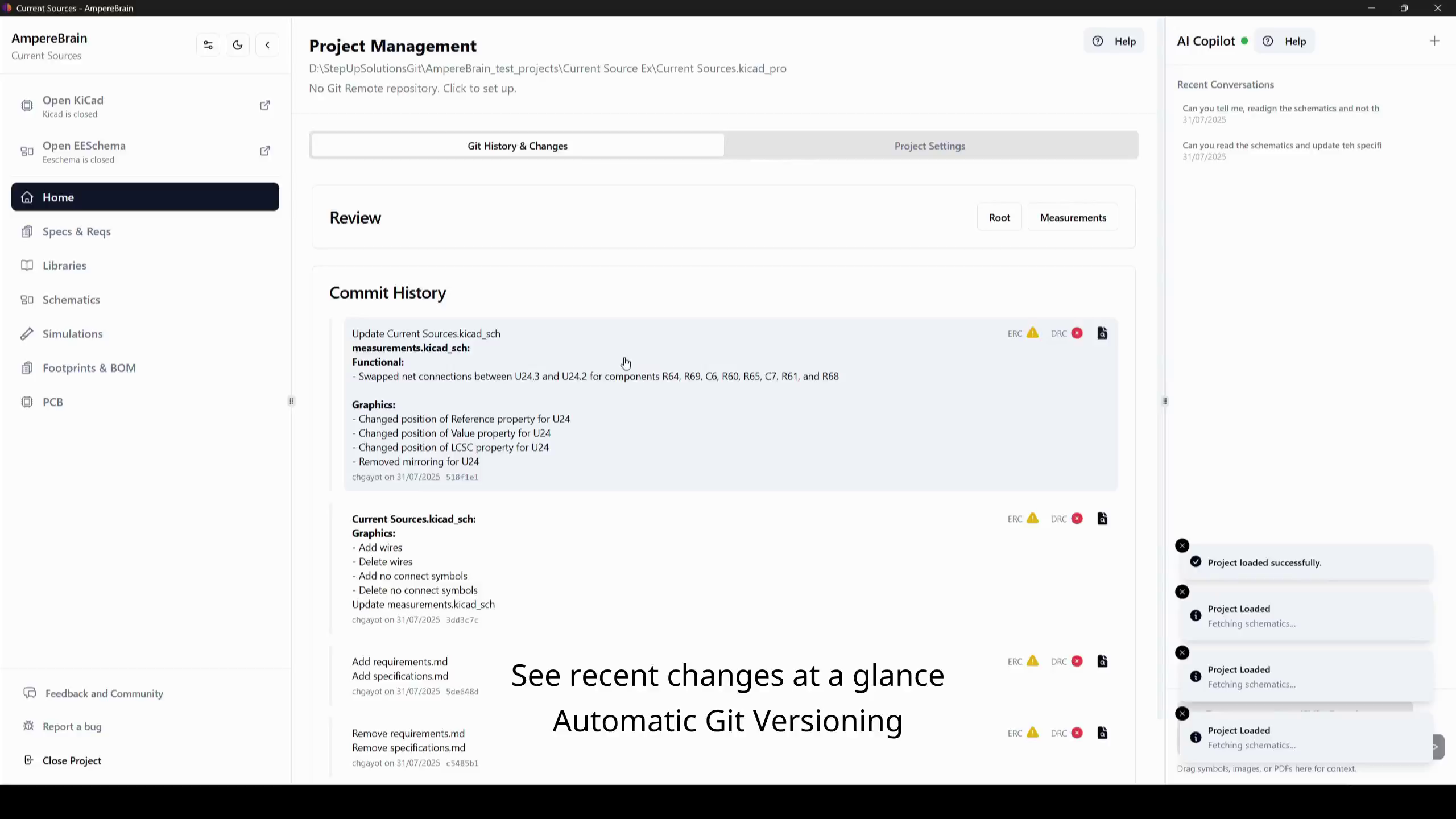
With automatic tracking, every change is saved and documented. Open and compare previous versions of your design.

Don't spend time writing commits, AmpereBrain handles it for you. Commits are created automatically with descriptive messages. You can write your own too.

04

Smarter Library Management

Stop wasting time on your libraries

Bring symbols, footprints, SPICE and 3D models, and the technical documents behind them into one place, automatically versioned and always up to date.

Find datasheets, application notes, and errata automatically, search them fast, and let AmpereBrain compare your KiCad footprint against the datasheet reference before it becomes a production issue.

05

Fast Reviews & Issue Tracking

Get feedback faster than you design

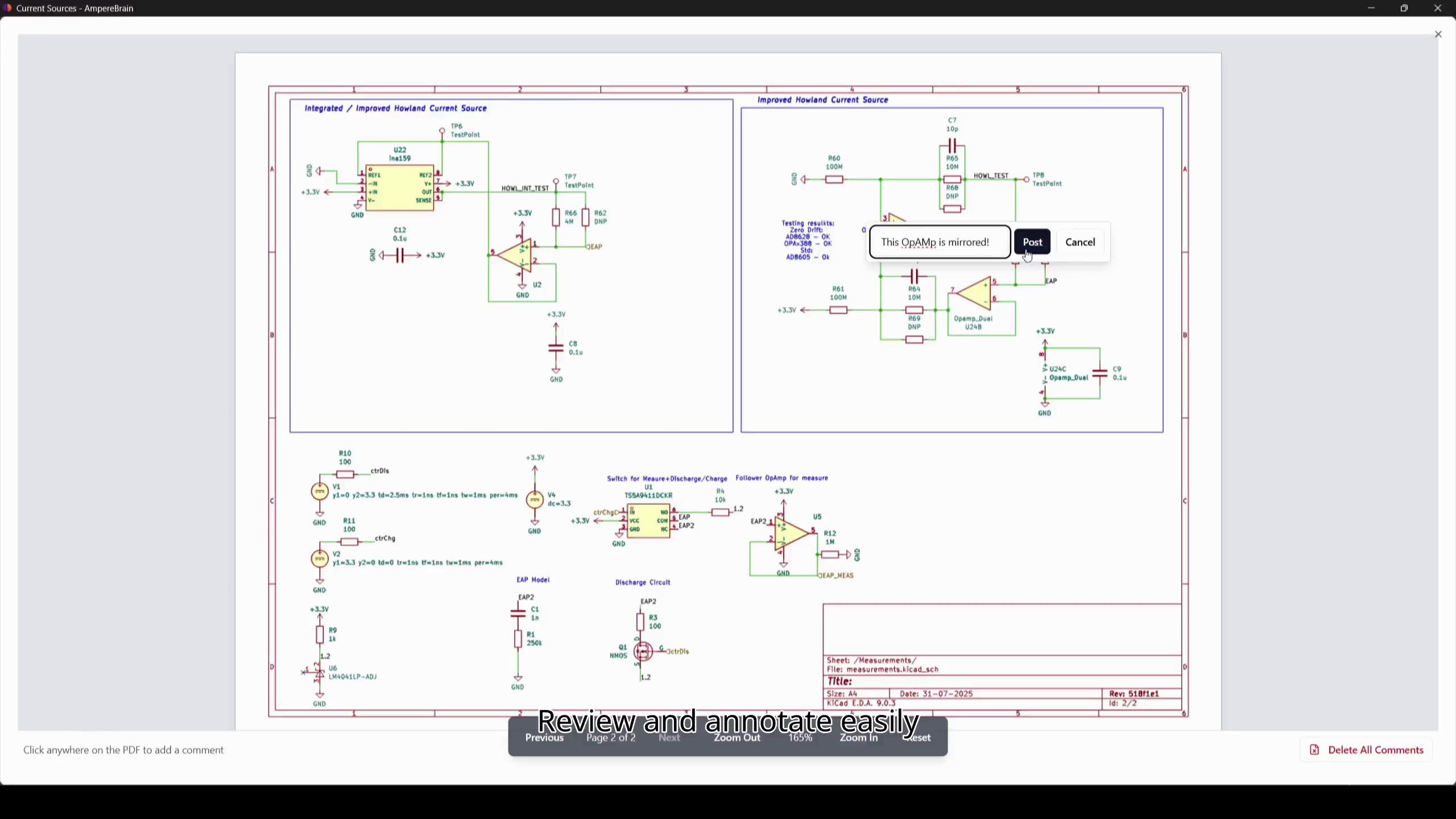
Review immediately: visual diffs, comments pinned directly on the schematic, threads, and severity levels. See component details and datasheets in one click.

Feedback becomes tracked issues instead of chat messages, and every decision stays tied to the revision it belongs to. Full issue tracking for boards, with several reviewers in the same discussion.

06

Simulation Without Drift

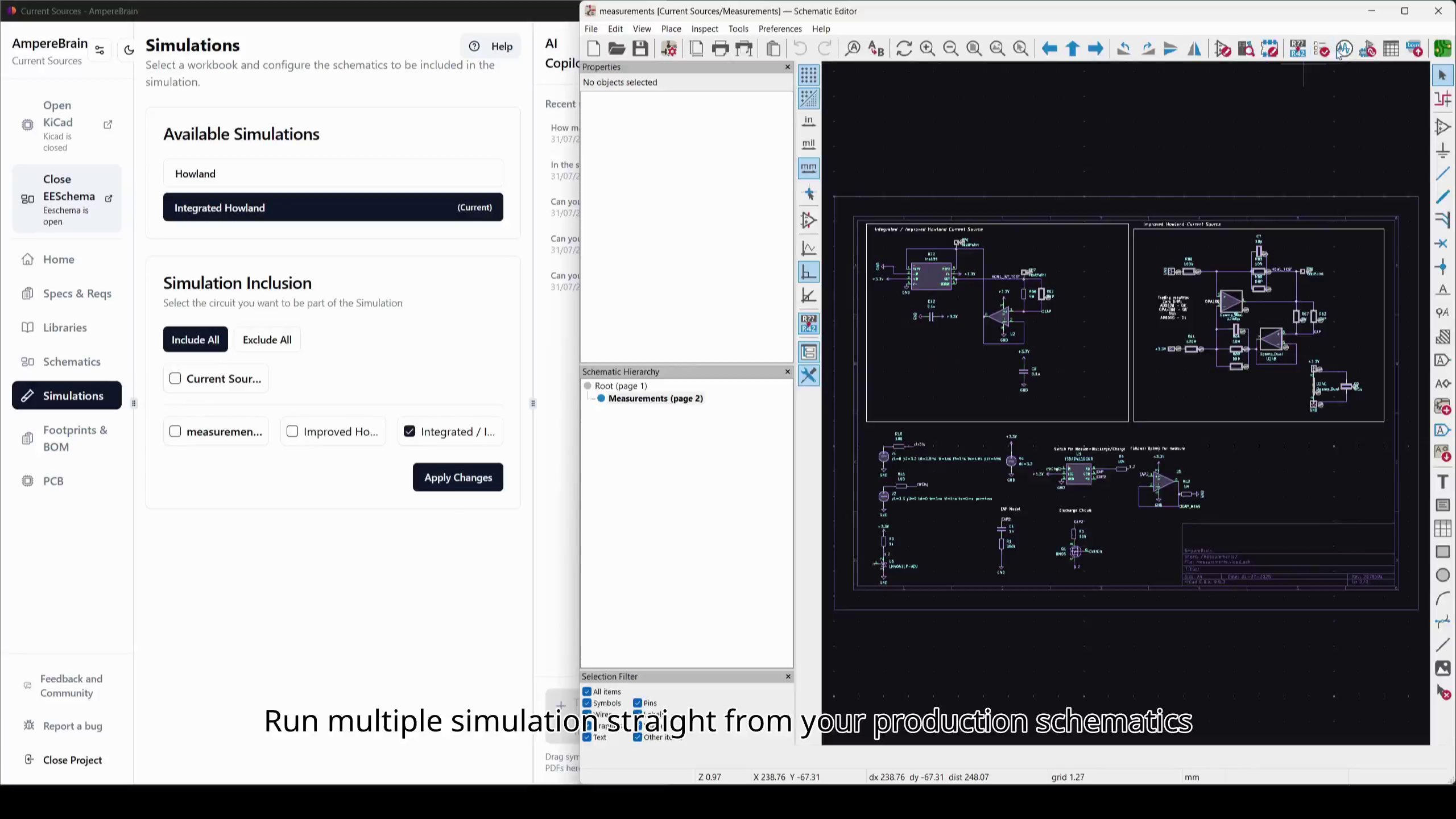
Simulate directly from your production schematic

Remove the drift between your SPICE simulation and the board you actually build, because they are the same schematic.

Variants, grouping, and quick exclusions keep only the relevant circuitry in each run. Your simulation workbook stays tied to the project, so you can review it one last time before production.

07

Continuous Verification

Catch errors while they are still cheap to fix

Verification runs continuously in the background: ERC and DRC, part lifecycle and availability, footprint-to-datasheet compliance, and simulation against the production schematic.

You hear about a problem the moment it is introduced, not when you're about to order the board. It covers the whole design: the schematic, the parts, and the documents behind them.

08

Smart Search & Answers

Get the right answer out of a datasheet, fast

Ask in chat and get cited passages, or use smart search that matches similar terms so the answer is found wherever it lives: the datasheet, the errata, or the application note.

Answers stay grounded in your project and your own documents, and the cited source passage stays visible in the viewer while you read the answer.

09

AI Copilot

An AI copilot that understands your circuitry

Turn project context into specifications, test reports, and technical documentation with diagrams and complex graphs when they help, and cross-check calculations against your design and its source documents.

It reads the schematic, the libraries, and the documents as one project, so its answers are grounded in the board you are actually building.

10

Ready-Made Exports

Export what each person downstream actually needs

Hand firmware engineers the technical documents as Markdown together with the pinout of your board and MCUs, so their agents can start coding. Send your mechanical designer the 3D model, and your manufacturer a ready-to-go fabrication bundle: Gerbers, CPL, and BOM.

The Gerbers, CPL, and BOM are generated from the project itself, using the profile of the fabricator you are building with, so the bundle arrives in the format they expect. Every export comes from the same versioned source.

The Complete Toolchain

Everything around the schematic, in one place.

Keep the project dashboard, version history, component libraries, reviews, specifications, simulation, and manufacturing exports in the same project workspace.

01

Versioning & Reviews

  • Automatic local Git history
  • Visual schematic PDF diffing
  • Comments pinned directly to the schematic
  • Threaded discussions with severity levels
  • Review status tied to each revision
  • Automated remote repository sync
02

Component Libraries

  • Global & project-scoped library segregation
  • Import parts from your preferred suppliers
  • Drag & drop component file uploads
  • Automated symbol/footprint/3D model linking
  • Automatic datasheet, application note, and errata retrieval
  • Footprint-to-datasheet reference comparison
03

Schematic Intelligence

  • Multi-sheet schematic tree navigation
  • Group-level subcircuit isolation
  • Automatic ERC/DRC checks when files change and before commits
  • Automated stale datasheet cleanup
  • In-app datasheet viewer with citation highlighting
04

BOM, Parts & Sourcing

  • Stock and price visibility from connected distributors
  • Smart part matching and assignment across suppliers
  • Lifecycle status and availability tracking
  • BOM auto-population by schematic group
  • Pre-design component search & selection
  • Component-to-document coverage tracking
05

Documentation & Vault

  • Git-synced project Document Vault
  • Component-linked documents and citations
  • Markdown-based specs and requirements editor
  • Automated requirement template generation
  • Requirements review and approval tracking
  • Test results and industry-specific document types
  • Searchable project documentation
  • Advanced metadata and tagging system
06

AI Copilot

  • Project-aware answers grounded in your schematic and documents
  • Specifications, test reports, and technical documentation drafting
  • Diagrams and complex graphs from project context
  • Calculation cross-checks against your design and datasheets
  • Datasheet search with visible cited source passages
07

Project Dashboard

  • Project status and quality on one screen
  • DRC and ERC results per revision
  • BOM status and part availability for each production variant
  • Simulation status checked against the production schematic
  • Specifications and requirements waiting on review or approval
08

Simulation

  • Simulation built from the production schematic itself
  • SPICE models linked straight from the component library
  • Variants, grouping, and quick exclusions for each run
  • No drift between the simulated and the manufactured circuit
  • Simulation workbook versioned with the project
09

Manufacturing Exports

  • Ready-to-go fabrication bundles matched to your fabricator
  • Gerbers and CPL generated from the manufacturer profile you select
  • Custom BOM built from the project
  • 3D model export for mechanical design
  • Markdown documentation and pinouts for firmware teams
  • Every export generated from the same versioned source

Pricing

No feature gates.

Beta access includes the Pro version at no cost. After beta, choose Free for open-source projects, Pro for additional AI capacity, or Enterprise when your team needs to run AmpereBrain inside its own infrastructure.

Add AI credit packs on Pro, or use your own models and document processing on Enterprise.

For hobbyists

Free

The complete hardware workflow, free for open-source projects.

Free

Join the beta

Includes

  • Project dashboard: status, quality, and part availability
  • Automatic revision tracking and local-first Git history
  • Visual schematic diffs and review annotations
  • Component libraries with linked technical documents
  • Schematic navigation and automatic ERC/DRC checks
  • BOM management, supplier sourcing, and lifecycle tracking
  • Specs, requirements, and Git-synced Document Vault
  • Simulation setup from the production schematic
  • Project-aware AI copilot
  • Manufacturing exports: Gerbers, CPL, BOM, and 3D models
  • Limited AI credits
  • Product analytics enabled by default
Beta offer

For teams and freelancers

Pro

More AI capacity for regular design work, with clear data practices.

€49/ month

Free while in beta

Join the beta

Includes

  • Everything in Free
  • More AI credits for everyday design work
  • Analytics enabled during beta
  • Privacy-first project workflows
  • Additional AI credit packs available when needed

For teams with their own infrastructure

Enterprise

Run the complete AmpereBrain stack inside the boundary your team controls.

Contact us

Talk to our team

Includes

  • Everything in Pro
  • Fully on-premises deployment
  • Run with your own LLMs and AI models
  • Run your own document processor
  • Documents and processing stay inside your infrastructure
  • Telemetry fully disabled
  • Custom AI capacity and deployment planning

FAQ / Field Notes

The practical answers, plainly stated.

Beta access, supported environments, and the data practices that matter before you put AmpereBrain into a real workflow.

Read the Privacy Policy for the full data-handling details.

Does AmpereBrain replace KiCad?

No. AmpereBrain is the local-first companion that supercharges KiCad. You still design in KiCad, while AmpereBrain takes care of the grunt work: libraries, reviews, version history, specifications, manufacturing exports, and AI-assisted workflows.

If I open a project in AmpereBrain, am I locked in?

No. AmpereBrain uses native KiCad fields wherever possible to enrich your projects, and its Git integration follows standard workflows. Your project remains usable in KiCad and manageable with the tools you already trust.

Can I keep specifications and requirements in AmpereBrain?

Yes. They start from a structured template, and the AI copilot helps you complete them and keep them in sync as the project evolves. Everyone reviews and approves the same version, and the documents stay versioned with the project. The same structure covers test results and other document types for your industry.

Is AmpereBrain free?

During beta, AmpereBrain is available as the Pro version at no cost. After beta, Pro pricing will apply. Open-source projects will continue to have access to the Free tier.

How long will AmpereBrain remain in beta?

There is no fixed end date. Beta will continue until we have gathered sufficient feedback and the software is stable enough for general availability.

Can I use the beta for professional work?

Yes. You can use AmpereBrain beta for professional work. Analytics remain enabled during beta so we can diagnose issues and improve stability. Analytics are sent to and owned by AmpereBrain on our own infrastructure; we do not use a third-party analytics provider.

Which KiCad versions are supported?

AmpereBrain supports KiCad 10.0 only, including 10.0.x patch releases. Backward compatibility with KiCad 9 and earlier versions is not supported.

Which operating systems are supported?

AmpereBrain supports Windows, macOS, and Linux. On Linux, KiCad can be installed traditionally or through Snap and Flatpak.

Vision

Hardware work should feel less fragmented.

AmpereBrain began as an internal tool to answer a stubbornly practical question: how do we make our own electronics design work more efficient and less annoying?

The long-term goal is to lower the barrier to advanced hardware workflows by importing the best parts of software practice, versioning, traceability, testability, and faster feedback loops, without forcing electronics designers to become software developers.

Local-First & Secure

AmpereBrain does not host your design: your project stays on your machine. Two tasks use our servers — OCR for the documents you send, and AI inference, which Enterprise can route to its own models.

Intelligent Design Assistant

An AI copilot that actually understands your schematics, automating grunt work from datasheet analysis to requirement drafting.

Effortless Revision Control

Automatic tracking of every change. See visual diffs, manage libraries, and verify designs without overhead.